


16 Jan GPS Tracks Truncated.. doh!
How many times to I forget that my Garmin 60CSx GPS can only handle tracks that are 500 points or less?!?!
Well, I finally figured out why this happens and how to fix it. See when I get home from a ride I dump my tracks & waypoints to Mapsource and then tidy everything up, usually resulting in one big track like so, 2,087 points!
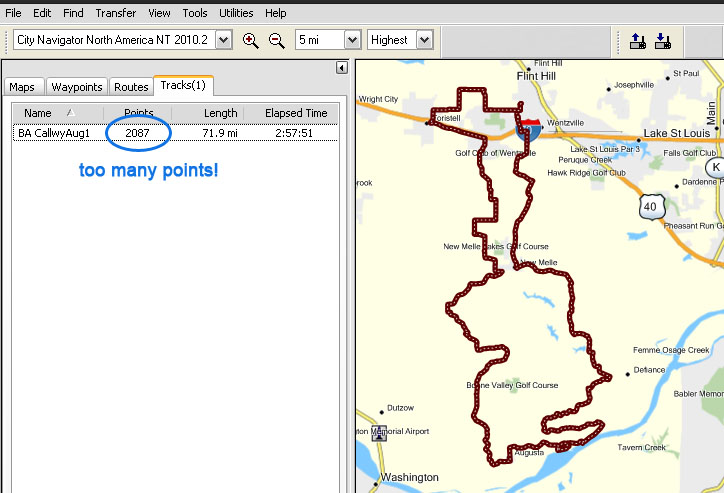
Now what do you do? The new versions of Mapsource has a cool feature to “divide” your tracks, so this is one solution but an even better that has worked for me is, the Track Filter feature…
Make a backup
First, you may want to create a copy of your track before proceeding just in case anything happens you don’t like. Select the track in the Tracks tab, right-click on it and choose Copy. Now right-click on the same track and choose Track Properties, rename the Track just so its a different name. Click OK. Now right-click in the whitespace in the Tracks tab and choose Paste. You will see a new Track pasted in with the original name.
Lets Filter it!
Select the track in the Tracks tab, right-click and choose Track Properties…
On the Track Properties window, in the lower right, click the Filter.. button

In the Filter window at the bottom choose Maximum Points and enter the value 500, like so:

Now click OK and you will see the Track being recalculated to only 500 points. Here’s how mine looks after going from 2,087 points down to 383, track looks the same and will now download to my GPS without any Track Truncated errors!
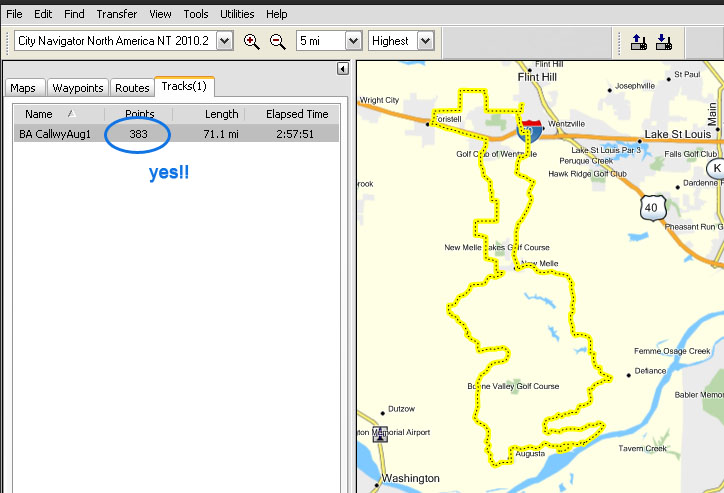
You will want to go over your track and make sure the changes are what you want. So far this feature has worked well and saves a LOT of time! Let me know if there are better ways of doing this stuff, working with Mapsource, Google Maps, & Google Earth are all part of the adventure!
Chris Luhman
Posted at 10:29h, 17 JanuaryThanks for the tip. How do you like your 60CSx? I’m going to get a GPS soon, and am torn between that and the Oregon 300.
I’ve played with http://ridewithgps.com/ and it has some interesting features.
http://www.gpsvisualizer.com/ is also a really easy way to get a jpeg from a gpx file.
Basher
Posted at 20:16h, 17 JanuaryHey Chris.. so for the $ you can’t go wrong with the 60CSx, its very rugged and doesn’t loose signal when in the deep bush. So I like it quite well but there are some things I wish were different. If I had the cash to throw more at a GPS I probably would go to a larger GPS like the 276C, although it really scares me to take a spill with such an expensive unit.
So the 60CSx you can only have 20 Tracks on the unit itself to Map. It will save your tracks till its full on the SD card, I just pulled like 30 of them off the SD Card, but you don’t see all of those in the Track page to load up. So you need to use a mix of Routes and Tracks. Don’t get me wrong its a very capable unit for sure and make sure you get the ‘x’ version so you can load up external SD cards. I have a 4Gb in mine, I have all 49 states plus Canada loaded. Here’s some specs:
Waypoint/icons: 1000 with name and graphic symbol, 10 nearest (automatic), 10 proximity
Routes: 50 reversible routes with up to 250 points each, plus MOB and TracBack modes®
Tracks: 10K point automatic track log; 20 saved tracks 500 points each let you retrace your path in both directions
Trip computer: Current speeed, average speed, resettable max. speed, trip timer and trip distance
Alarms: Anchor drag, approach and arrival, off-course, proximity waypoint, shallow water and deep water
Tables: Built-in celestial tables for best times to fish and hunt, sun and moon rise, set and location
Map datums: More than 100 plus user datum
Position format: Lat/Lon, UTM/UPS, Maidenhead, MGRS, Loran TDs and other grids, including user UTM grid only
Thanks for the GPS links, I’m checking them out !
david
Posted at 22:11h, 06 AprilThanks for this … I was trying to deal with a track that hat 6k points .., the filter function got it down to about 283, and some manual tweaking got it down to 170. I think I can get it even smaller.
Basher
Posted at 22:20h, 06 AprilI’m glad it helped you… I’ve learned so much about routing over the last few years I need to add some more posts like this one! Good luck!
Andrisig
Posted at 23:00h, 05 JulyHello Basher,
I have a question about the external memory in the 60CSx. You mentioned a 4 Gbyte SD card loaded. Will that work in de 60CSx? According to information I’ve found elsewhere the maximum this unit can handle is an 2Gbyte Card. I can’t test is for myself because I don’t have a micro SDHC 4Gbyte laying around, but will buy one if the 60CSx takes it and if it uses the full 4Gbyte capacity of that card.
Thanks for the instructions regarding the track points. Very helpful. Also you the specifications list of the Garmin is better put together than I’ve ever seen.
I hope you will respond to the question regarding the external micro SD-card 🙂
Cheers
Basher
Posted at 15:19h, 07 JulyAndrisig, thanks for your comment!
I can tell you that I have a 4Gb MicroSD card in my Garmin 60CSX. I just put it in my card reader and plugged it into my Mac, it has 2.74Gb of data on it of the 4Gb. But I’m not completely confident it is using more than the 2Gb limit that I have read about as well. Unless with the firmware version on my 60CSx is is actually using all of the 4Gb space. I will have to do a little more investigation, but the 60CSx will read and use a 4Gb SD card, mine does!
Andrisig
Posted at 00:48h, 08 JulyHi Basher,
It would be nice to hear what your test results will be.
On the Garmin support web page it says :
Changes made from version 3.70 to 3.90:
• Added support for maps greater than 2 GB.
Does this mean the unit does take bigger SD-Cards? The SDHC kind?
I’ve found the following information regarding my Garmin GPSMap 60CSxunit:
The firmware version:
Software Version 4.2 and
GPS SW Version 2.3m
Software Version 4.2 >> Isn’t that strange? The latest version listed by Garmin is: 4.00 May 26, 2009?
GPS SW Version 2.3m >> code used by the receiver circuit. I don’t need or can update this?
Addendum:
How can I tell what version of firmware is in my Garmin GPSMap 60CSx?
MENU > MENU > Setup > ENTR > System > ENTR > MENU >Software Version > ENTR